ZEISMO SEO Manual
Documentation

Everything ZEISMO SEO does, and how to use it

One plugin that handles your titles, schema, redirects, broken links, images, speed and AI writing. This guide walks through every screen with real screenshots from the live demo.

Getting started

From zip file to fully configured in under three minutes. Nothing here requires a developer.

  1. Install and activate. In wp-admin go to Plugins, Add New, Upload Plugin, choose the ZEISMO SEO zip and press Activate.
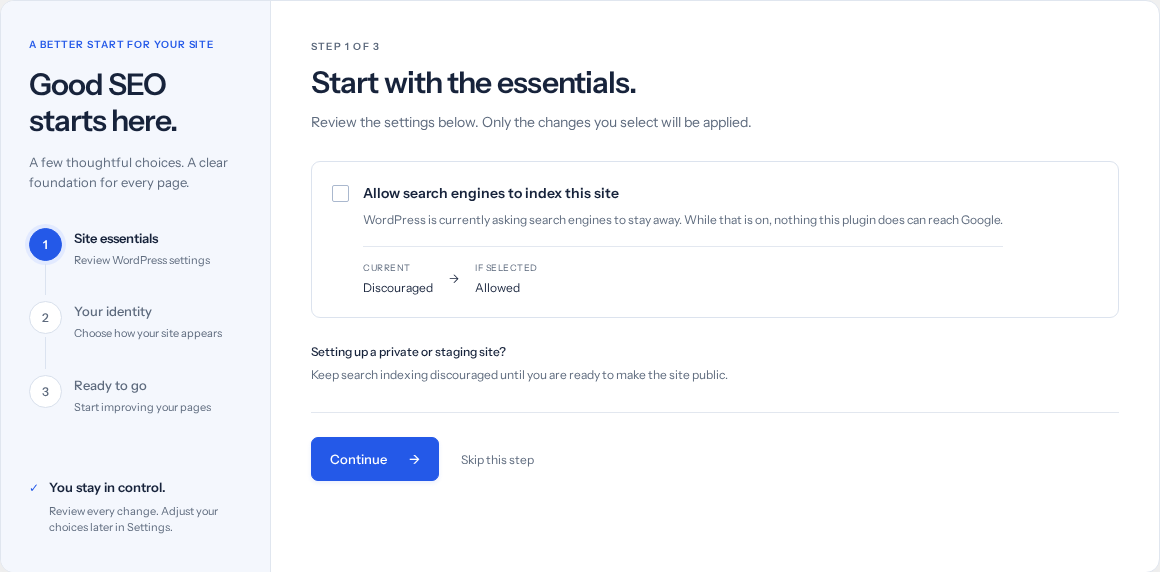
  2. Run the setup wizard. It opens automatically. The wizard reads your site, proposes the recommended WordPress settings, and asks for your confirmation before changing anything. It also asks whether you are a Beginner (full autopilot: every SEO detail filled in for you) or a Professional (same autopilot, plus your own popular keywords get first priority in every suggestion).
  3. Create your free account (optional, recommended). Open the Plans tab and register right inside the plugin: name, email, done. No other website involved. It connects this site and switches on the free AI allowance.
Free means free. Every on-page feature works forever without an account, without a connection, and without our servers. Your site never depends on us to render a page.

The dashboard

One page runs everything. The left rail switches sections instantly, every action happens in place, and nothing ever navigates you away.

ZEISMO SEO dashboard: health gauge, coverage, top things to fix, stat tiles, score distribution, pages needing attention and AI usage
The Overview: SEO health gauge, coverage, a prioritized fix list, live stat tiles, score distribution, the pages that need attention, and this month's AI usage.

Reading it

  1. SEO health is the average live score across your published pages. Watch it climb as you work through the fix list.
  2. Top things to fix is ordered by impact. Each row links straight to where the fix happens.
  3. Pages needing attention lists your lowest scoring pages with an Improve button that opens each one in the editor.
  4. The stat tiles are clickable: Active redirects opens the redirect manager, Broken links opens the scanner, and so on.
  5. Visitors is a live, cookieless view counter (the ZEISMO beacon, nothing stored about the visitor). The number and the 24-hour bars update by themselves while the panel is open.
  6. What is holding your score back charts the most common failing checks; work the pages and the bars shrink live.
  7. The admin bar carries a ZEISMO SEO badge everywhere: the site's health score in color, plus a red counter when something needs attention.

Writing a page that ranks

The ZEISMO SEO panel sits under the editor on every post, page and product. It scores the page live as you type.

The ZEISMO SEO editor panel: live checklist, focus keyword, SEO title, meta description and Google preview
The editor panel: AI buttons, focus keyword, title and description with live counters, and a real Google preview.
  1. Set a focus keyword. The phrase you want the page to rank for. Every check on the left recalculates against it as you write.
  2. Write the SEO title and description, or press the AI button and let it draft both from your content. The counters keep you inside Google's display limits, and the preview shows exactly how the result will look.
  3. Work the checklist. Green means done. Each item is a plain sentence, not jargon.
  4. Open Advanced for canonical URLs, indexing switches, social cards, FAQ rich results (plain Q: and A: lines) and hreflang language versions.
  5. Use the internal link ideas at the bottom: your own related pages, each with a copy-link button. Pages that link to each other rank better.
Templates: titles accept %title%, %sitename%, %sep% and %tagline%, so one pattern can cover a whole site.

The feature grid

The Features tab shows every capability with its live state and real numbers: what is on, what it is doing, and where to manage it.

The Features tab: every plugin capability as a card with live counts and status
Every feature as a card. Counts are live: redirects, logged 404s, broken links, images without alt and more.

Redirects and 404s

Send old or broken URLs to the right place, and see every 404 your visitors actually hit.

Redirects and 404 monitor: add form, active rules with hit counts, and the 404 log
Add a rule at the top; the tables below show active redirects with hit counts and the 404 log.
  1. Type the old path, the new destination, pick a type (301 for permanent moves, 410 for pages gone for good) and press Add. The rule is live immediately.
  2. When a visitor hits a page that does not exist, it appears in the 404 log with a hit count. Press Create redirect on a row and the form is pre-filled for you.
  3. Redirects are matched from an in-memory map, so your visitors never pay a database query for this.

Performance

Google ranks with real speed. One click runs Google's own PageSpeed check on your homepage, from ZEISMO's servers.

Performance screen with the Core Web Vitals check
The mobile performance score, lab metrics from the check, and Google's real visitor data where available.

Available on the Growth and Scale plans; each check counts as one AI task from your monthly allowance.

Import from other plugins

Switching from Yoast, Rank Math or All in One SEO? Bring your titles, descriptions, keywords and social settings in one click.

Import screen listing detected SEO plugins and how many pages carry data
The plugin detects what the others left behind and shows exactly how much there is.
Safe by design: imports only fill blanks. Anything you already set in ZEISMO SEO stays exactly as it is, the other plugin's data is left untouched, and running an import twice changes nothing.

Settings and search appearance

Everything preset to our recommendation, everything editable. The toolbar switches sections so there is no long scroll.

Settings with the section toolbar: brand, titles, search appearance, search engines and AI, local business, account
Brand and logo, title templates, archive hygiene, AI crawler control, the local business profile and your account token.

What lives here

Brand

Your logo (used in search results and as the social sharing fallback), organisation name and X account.

Search appearance

Title templates per content type, plus the standard hygiene switches: date archives, internal search and attachment pages kept out of Google.

Search engines and AI

IndexNow instant indexing, automatic image alt text, and whether AI assistants may read your site. Your sitemap and llms.txt are linked here.

Local business

Address, phone, price range and opening hours. Fill it once and your site emits the LocalBusiness data Google reads for the map pack and "open now".

SEO on autopilot

A page never sits at 0/100 just because nobody opened the SEO box.

  1. While you write, the panel fills its own blanks: the focus keyword from your title, the SEO title from the sitewide template, the description from your first sentences. A field you have typed in yourself is never touched.
  2. On every save, the server side guarantees the same: whatever is still empty gets our recommendation, whichever editor or builder did the saving.
  3. On install, your existing published pages are filled in once, in one pass. Everything stays editable in the SEO panel afterwards.

Target keywords

Pick them with one click, and they go where crawlers actually read.

  1. Suggestion chips under the focus keyword field offer keywords from your title, your content and your site's existing keyword set. Professionals' seed keywords from the wizard always lead the list. One click picks one; typing your own always works.
  2. Published for crawlers: each page's keyword goes into its meta keywords tag and its schema, and the site's full keyword set is listed in llms.txt for AI assistants.
  3. The Overview label shows your whole keyword set with how many pages target each one.

Competitors

Add up to three competitor sites and compare, keyword by keyword, with the same yardstick used to score you.

The Competitors tab: saved competitors, keyword picker and the side-by-side comparison table
Your page against theirs: score, keyword usage, content depth, and concrete ways to win.
  1. Save your competitors' domains once.
  2. Pick a keyword and press Compare. Their public page is fetched through ZEISMO's servers and measured on the same signals: keyword in title and description, content length, headings.
  3. How to win this keyword turns the numbers into plain instructions, like "they cover the topic in 1,800 words, your page has 600".
  4. Where live Google positions are enabled for your account, each row also shows real ranks. The on-page comparison runs from your own site and is free on every plan; comparisons cache for a day.

The AI assistant

All AI runs on ZEISMO's servers with ZEISMO's own Claude access. There is no API key to buy, nothing to configure, and nothing in the plugin for pirates to steal.

ButtonWhat it doesFrom plan
Write title & descriptionDrafts both from your actual page content, inside display limits.Free
AI image alt textWrites accessibility-grade alt text for an image.Starter
Optimize with AIReads the page and returns concrete, specific edits, not generic advice.Growth
Content briefA writer-ready brief for your focus keyword: headings, length, related terms.Growth
Speed checkGoogle PageSpeed on your homepage, run from our side.Growth

Locked buttons stay visible with a small lock. Pressing one tells you which plan unlocks it, in one sentence, with a link to the Plans tab. Nothing is hidden and nothing pretends to work.

If our servers are ever unreachable, only the AI buttons pause, with a plain one-line message. Every other feature keeps working, and your visitors notice nothing.

Plans, limits and billing

Four packages, priced to be an easy yes. Register and subscribe entirely inside the plugin; payment runs through Stripe's secure checkout.

The Plans tab: current plan with AI usage donut, four packages, and the full feature matrix with locks
Your current plan and this month's AI usage at the top, the four packages, and every feature marked per plan.
PlanPriceAI tasks per monthBest for
Free$015Every on-page tool, forever. A taste of AI.
Starter$4.99/mo300AI titles, descriptions and alt text, all month.
Growth$9.99/mo1000Optimize-with-AI, briefs and speed checks.
Scale$19.99/mo3000Agencies and heavy publishers.

How subscribing works

  1. Open the Plans tab and create the free account if you have not (name and email, right in the form).
  2. Press Upgrade on a package. A secure Stripe checkout opens in a new tab; the plugin never sees your card.
  3. After payment your plan flips automatically within a minute. The usage ring shows what is left of this month's AI allowance, and it resets on the first of each month (UTC).

Credit top-ups

Need more before the month refills? One-time credit packs (100 for $2.99, 500 for $9.99, 2,000 for $29.99) are on the Plans tab. Credits never expire and are spent only after the monthly allowance.

Cancelling drops the site back to the full free tier. Your titles, redirects, schema and every local feature keep working exactly as before. Never off a cliff.

Page builders

Elementor, Divi, WPBakery, Beaver Builder, Oxygen, Bricks and Brizy all get the same treatment.

  1. The SEO panel attaches to every public content type, so builder pages are managed exactly like normal ones.
  2. Builders that keep content in their own format (Elementor for one) still get real analysis and link scanning; the plugin reads their data directly.
  3. While you are designing inside a builder, redirects and other front-end rules stand down completely. You will never be redirected out of your own editor.
  4. The admin bar shows the current page's live SEO score on the front end, with one-click paths to edit its SEO or fix a 404.

Caching and minifying plugins (WP Rocket, LiteSpeed, Autoptimize and friends) are safe with ZEISMO SEO by construction: the plugin adds zero render-blocking assets to your site.

Language and RTL

The plugin speaks English and Arabic, independently of the rest of wp-admin.

Two ways to switch: the one-tap toggle in the dashboard header, or Settings, Brand section, Plugin language (follow the site, English, or Arabic). Arabic also flips the plugin's screens to right-to-left. Only ZEISMO SEO's own screens change; the rest of the admin stays as your site has it.

On your phone

The whole control panel works one-handed on any screen size.

On phones and tablets everything stacks into a single column sized to the device: the tab rail becomes a swipeable strip, forms and cards fill the width, and wide tables scroll inside their own box with a finger, never the page. The screen itself never pans left or right. Every important button carries a one-line explanation underneath, so nothing needs guessing on a small screen.

Updates

Updates arrive through WordPress's normal update system, from ZEISMO's own channel.

When a new version is approved on our side, your Plugins screen shows it with the release notes, and one click installs it. The plugin checks twice a day; nothing is announced before we approve it.

Questions

Does the free plan expire?

No. Free is a real product, not a trial.

Do I need an API key for the AI?

No. That is the point: the AI runs on ZEISMO's side, on our account. You just press the button.

Can I use it next to another SEO plugin?

Run one SEO plugin at a time; two will write duplicate tags. Use the importer first, then deactivate the old one.

What happens to my data if I uninstall?

Your titles and settings live in your own WordPress database, in plain post meta. Nothing is held hostage.

Where do I get help?

Write to support@zeismo.com and a human answers.